

Why iAsk.ai is putting video inside AI search

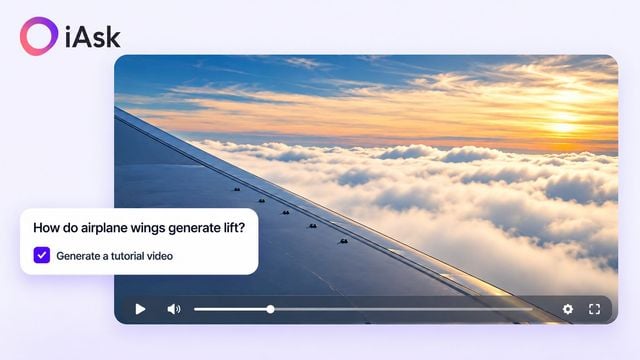
The most revealing part of iAsk.ai’s Search-to-Video feature may be its placement. A user arrives at the homepage with a question. Alongside the search controls sits a checkbox: “Generate a tutorial video.” The new capability appears at the moment someone is deciding what they want explained.
People can ask AI anything in natural language and request a video explanation before submitting. According to iAsk, the feature is available to everyone. It adds a playable tutorial alongside the written result, extending the product’s existing question-and-answer experience.
For founders and product teams, that makes this an interesting design choice. Video generation becomes part of a task the user already understands. The product asks for the subject through a familiar question box, then offers another format for exploring the answer.
Put the capability next to the need
Consider someone investigating how aircraft stay in the air or how a solar panel works. Their immediate goal is to understand a subject. Placing the tutorial option beside the question lets them request a visual explanation without first turning that curiosity into a separate content-production task.
The AI tutorial video is generated in response to the submitted question. In the workflow iAsk demonstrates, there is no additional script, storyboard or collection of images to prepare. The question provides the subject, and the result brings the explanation back into the search session.
That is a clear proposition to communicate: ask, then watch and read. The interface gives the extra output a recognisable place in the experience. It also leaves video as a choice the user makes when submitting, rather than requiring a different starting point for every question.
Show the outcome in context
iAsk’s launch film illustrates the feature with “How do black holes form?” It shows the question and tutorial checkbox, excerpts from a generated explanation and the result page with text beneath the video. This is an edited product demo that makes the interaction visible.
iAsk’s edited launch demo follows a black-hole question from the search box to a generated video explanation and written answer. Video supplied by iAsk.
For a product team, showing the output in its eventual setting answers a practical question: where does this new capability belong in the user’s day? Here, the video sits with the answer the person requested. Its relevance comes from the search that prompted it.
That context also gives the written response a continuing role. Someone can watch the tutorial to approach an unfamiliar subject, then read more closely or return to a particular passage. The experience accommodates a change of format without requiring a change of subject.
Keep the next action close
A generated explanation can lead to a more precise question. After an introduction to flight, a user might want to explore what changes during take-off. After a question about solar power, they might ask about the equipment between a panel and a household appliance.
iAsk’s broader search experience includes written answers, source citations and follow-up questions. Those elements give users ways to investigate what they have just encountered. The product’s appeal is the continuity between asking, exploring an explanation and deciding what needs more detail.

The potential uses extend beyond formal study. A student seeking an AI homework helper and a professional getting acquainted with an unfamiliar technical concept may want different levels of detail. Both can begin with a question in their own words and decide whether a visual introduction would help.
A product decision that can be evaluated
For founders considering a similar feature, the design raises useful questions. Do users discover the option? Do they play the result, return to the text or ask a follow-up? These are ways to evaluate the experience, rather than outcomes established by the launch itself.
iAsk’s homepage tutorial generation is separate from its live AI Video Tutor. Here, the feature’s role is specific: create a playable explanation from a submitted question. Keeping that role clear helps readers understand what they are choosing when they tick the checkbox.
The broader product lesson is about placement. iAsk is introducing video at the point where a person has already expressed a reason to use it: they want to understand something. The search box supplies the question, and the answer page brings the available ways of exploring it together.
For more startup news, check out the other articles on the website, and subscribe to the magazine for free. Listen to The Cereal Entrepreneur podcast for more interviews with entrepreneurs and big-hitters in the startup ecosystem.
